A button can render correctly while saving the wrong record. I ask a coding agent to run the authorized workflow, capture what the user sees, and check the resulting state against expectations we set before the change.
Update, September 29, 2026: This article now includes the locally tested Lighthouse checks, current permissions guidance and a runnable form exercise.
A green build answers useful questions. Types can check contracts; tests can check behavior. Neither tells me which user journey was exercised unless I inspect the checks. For a UI change, I also want to see the running page: which control the agent used, what happened after the click, and whether the intended result survived a fresh read.
Browser automation lets software drive a browser. With Playwright, Puppeteer or a product's browser tools, the agent can open pages, operate controls and capture what happened. I can inspect those observations even though the agent still authored both the change and the check.
What this looked like in my setup
In June 2026, my day-to-day agent was Claude Code with the official Playwright plugin enabled. Browser operations arrived as callable tools over MCP, a protocol for exposing tools to AI clients. My global settings pre-approved those operations, as I described in my guide to Claude Code permissions. I wanted a verification pass to run without stopping for an approval prompt every few clicks.
A browser can read a page, but it can also send a message, submit a purchase or change a record. I specify the environment, data and permitted actions before a pass. Permission to inspect a production page does not authorize changing its data.
I choose the workflows: load this page, submit this form, confirm the redirect, check what renders when the query returns nothing. The agent drives each one, reads the page and application state, and takes screenshots of the steps that matter. I inspect the images and compare the resulting state with what we expected.
Three places it has earned its keep
The suite the agent talked itself out of. In a December 2025 piece, I told the story of wanting end-to-end tests for a tool I was building. The agent advised against it: a proper suite would mean installing Playwright or Puppeteer, and that would be overkill for the project.
Overkill for whom? I estimated that configuring and troubleshooting the setup by hand would cost me three hours. The agent was pricing the work at human cost while its own labor was the thing being spent. I told it to install Playwright and build the suite. Three minutes later, I had critical-path coverage, including setup, teardown and assertions on actual behavior. The agent was right that the work was involved. It was wrong that this was a reason to skip it.
The committed gate. My personal site's repository carries a Lighthouse audit script for four pages: the homepage, the blog listing, a selected article and a static page. Its thresholds are 70 for performance, 95 for accessibility, and 80 each for best practices and SEO. In CI mode, an audit error or a score below its threshold produces a failing exit status.
An earlier version skipped absent categories, so a missing accessibility score could pass. The locally tested script now requires all four scores to be finite numbers from zero to one and rejects a failed Lighthouse process even if it emitted passing scores. It rejects invalid site URLs, retains the full validated URL when passing it to the tools, and stops before Lighthouse starts if the site is unreachable or its HTTP check ends with a non-2xx response.
The script rounds each score multiplied by 100 before comparing it. A raw accessibility result of 0.949 becomes 95 and passes, as does exactly 0.950; 0.9449 becomes 94 and fails. A passing automated score still leaves work for a person: Lighthouse's accessibility score excludes manual audits.
Eyes and hands beyond my own code. In May 2026, I directed a browser-based session across search and hosting tools: Google Search Console, Bing Webmaster Tools and Cloudflare. The work included resubmitting sitemaps and reading their status, inspecting URLs and reporting their indexing state, and, after the deployment, fetching the sitemap, robots.txt and a sample article on each site.
That session used the agent's built-in browser tooling rather than Playwright. The discipline belongs to the tool class, not to one library. An API can serve the same checking task when it exposes the operation: Google documents sitemap submission through the Search Console API. Sitemap acceptance, page indexing and search visibility are different states to verify.
Check the assembled application
Component tests and browser checks answer overlapping questions at different levels. A browser pass can expose a failure in how the application is assembled:
- The component passes its tests, but the route never mounts it. Open the actual route and check the expected content.
- The form submits, but the handler reads a field that was renamed. Inspect the resulting record, including the affected field.
- The modal renders underneath an overlay. Try the intended interaction and inspect the screenshot.
- Hydration fails, leaving a page that looks correct but does nothing. Operate the control after the page loads.
- The API returns an older schema. Check the response and the application's handling of it.
My open-source skills collection includes a verification protocol for tracing a change through its consumers. For UI work, the running application belongs in that chain.
A form that can look right and save the wrong thing
The downloadable workbook contains a fictional note form, a browser script and deliberately faulty variants. It uses a new server bound to 127.0.0.1, synthetic data and an explicitly permitted save_note action. It does not log into a service or replay any of my historical sessions.
Before the implementation, the exercise fixed a toast, Saved N001, and this complete expected state:
{"records":[{"id":"N001","text":"Return the library book"}]}The script must see that record after saving and again after reloading the page. Object key order can vary; extra fields, missing records, a different ID or changed text fail the comparison. The same server process keeps the data in memory, so this checks a page reload, not persistence across a server restart.
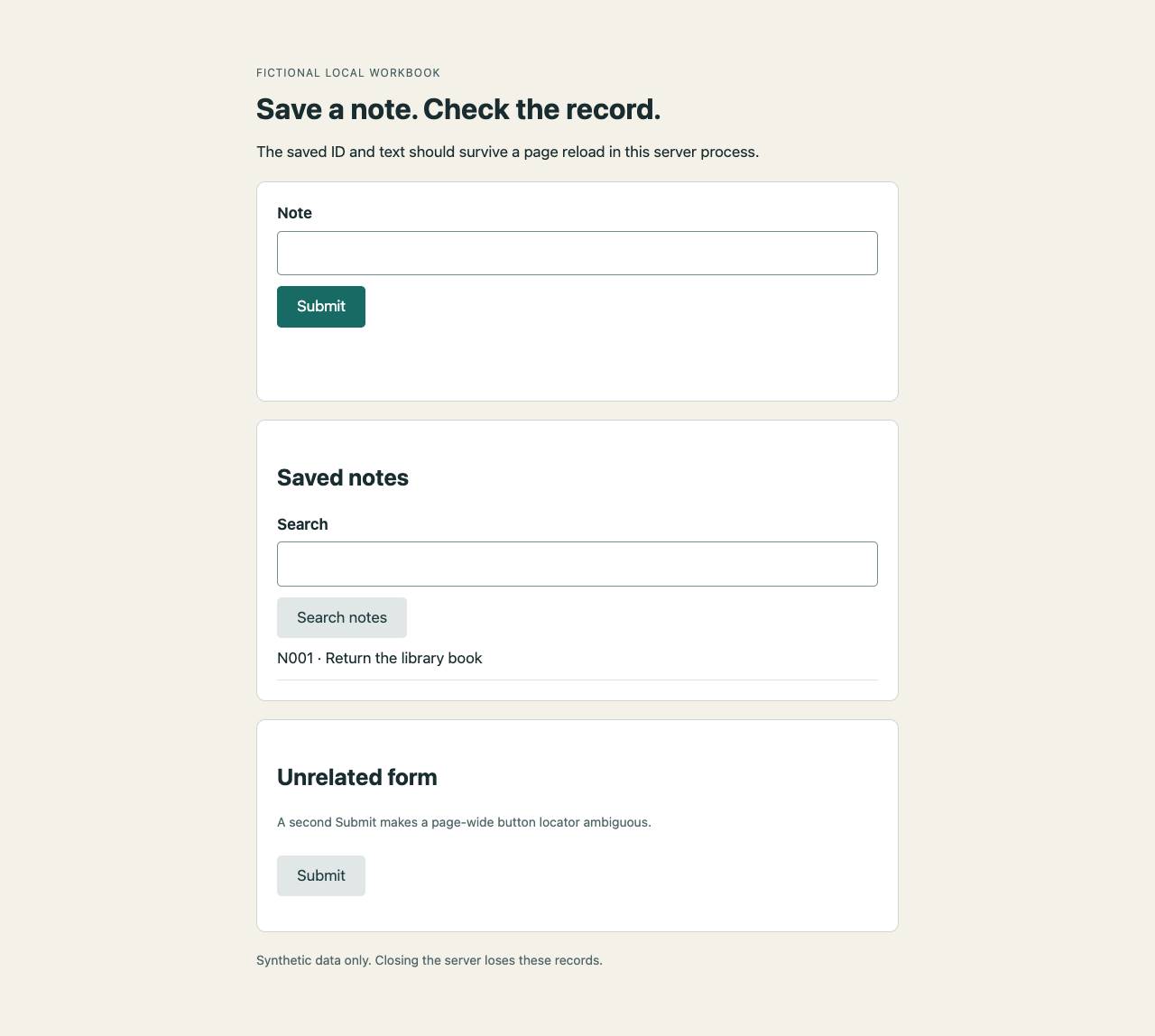
The correct form after reload. The earlier success toast is retained in the run's observation record.
| Case | What the check must establish |
|---|---|
| Authorized save | The correct control produces the expected toast, record and reload state. |
| Empty query | Searching for no-match shows No matching notes and returns an empty result array. |
| Wrong record, success toast | Storing N002 fails even when the page says Saved N001. |
| No record, success toast | An empty stored result fails. |
| Two Submit buttons | A page-wide locator is ambiguous; the locator scoped to the named form works. |
| Unauthorized destination | The application guard blocks the attempted operation before a request is made. |
| Missing evidence category | A constructed score record without accessibility is incomplete. |
| Covered button | Correct stored state does not excuse an overlay that blocks the user. |
The score objects in that completeness check are invented test data, not Lighthouse measurements of this form. The exercise also checks the correct form at desktop, 390-pixel and 320-pixel widths, a wrong-text variant and a forbidden action on the otherwise allowed origin.
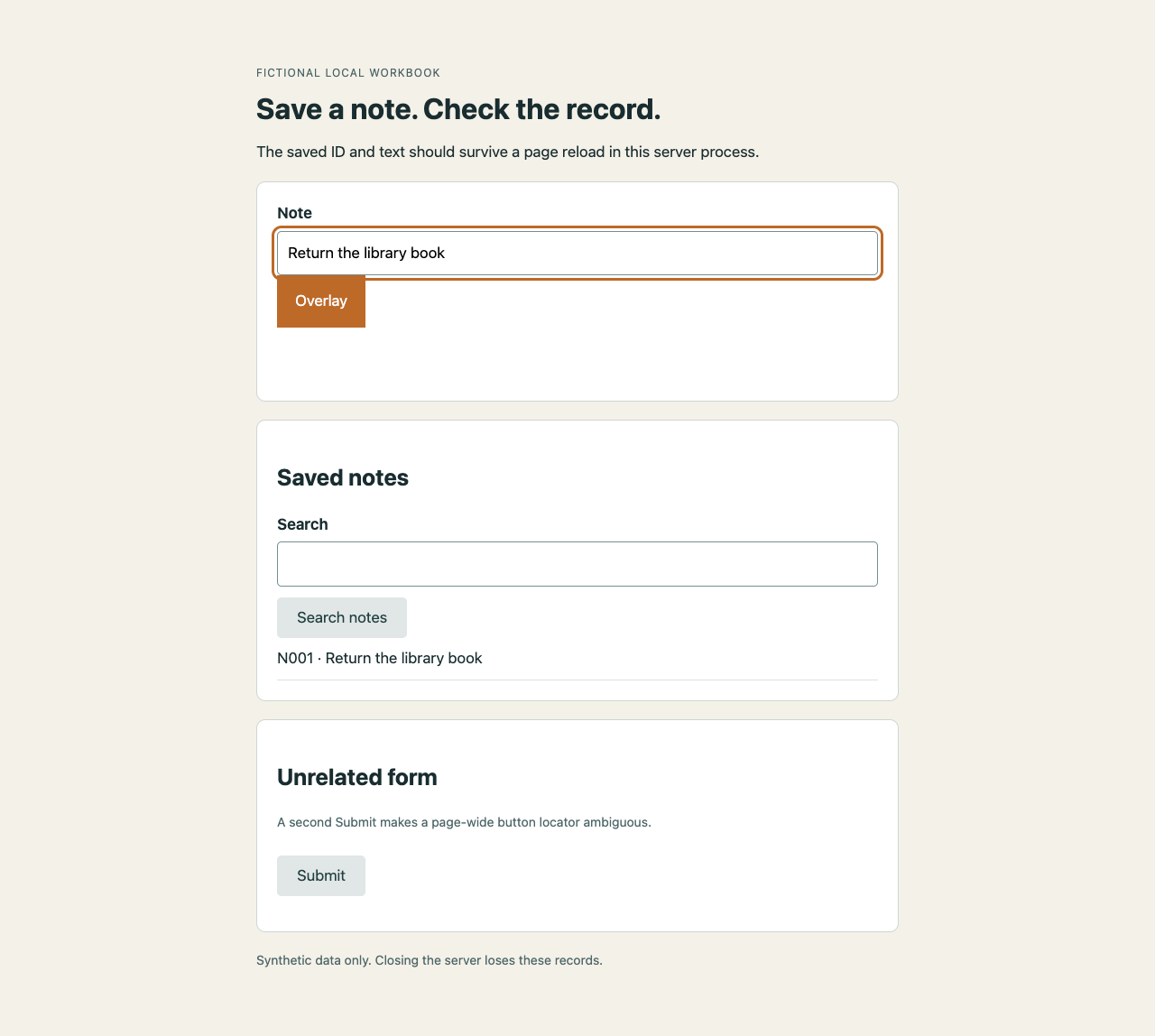
The overlay variant starts with the expected record already in memory. A state-only check would pass. The attempted click fails, and the screenshot shows why the control is unusable.
The download includes fault controls that alter one implementation file while retaining the expected values and the browser assertions. Removing the save, changing the ID or text, corrupting only the displayed label, ignoring a required evidence category, removing the application request guard, or choosing an ambiguous button must cause a relevant test failure. A separate request interceptor stays in place while the guard is deliberately broken: it aborts forbidden page requests before they continue. The resulting request log is evidence about that browser request path, not a machine-wide network audit.
Read the output in layers. The screenshot shows the visible result. The UI readback records the toast and displayed record. The state checks compare the saved data with the fixed expectation. The request log shows which actions were allowed or blocked. A reviewer still needs to assess the expectations and inspect the images; the implementation and its tests share an author.
Keep evidence useful at the handoff
In synthesis engineering, I direct the work and remain responsible for judging it. At handoff, I want the URL and environment, the source or build version, what was tested and the expected result alongside what happened. Screenshots, page readbacks, response bodies and score reports answer different questions. I can audit a screenshot in seconds. I cannot audit a feeling of confidence.
A teammate or a later session can inspect the same evidence and challenge my interpretation without reconstructing the conversation. A visual baseline is a reviewed reference image; it can itself be wrong or stale. Playwright's screenshot guidance also describes rendering differences across environments, so a screenshot comparison needs an identified environment.
Where it breaks down
Markup changes, and finding a Submit button is not always finding the intended Submit button. Both directed sessions and committed tests can use Playwright's role and label locators. The workbook's script identifies the named form before choosing its Submit button. If the interface changes, the test may need to change with it.
Authentication has required a human in my workflows. When the agent reached a CAPTCHA or two-factor prompt, it stopped and asked me. In one link-verification session, the browser layer also refused navigation to most of the domains I wanted until each received permission. A different tool or configuration needs its own permission check.
A committed end-to-end suite needs an owner: fixtures rot, selectors drift, and failed checks need diagnosis. Recurrence is the variable I use to decide what earns that maintenance. Repeated checks can justify a committed suite; exploring a particular change can justify a directed pass. The two approaches can coexist. My maintained suites were at the unit and integration level.
Rendering, submission, saved state, authorization and accessibility each need evidence suited to the claim. Whether the page is understandable and useful remains my call.
Ask it to open the page
The operating rule I've settled on: an agent's claim about its own UI work is a draft until we've checked the running application against the behavior we intended. When the agent tells you the fix works, don't ask it to explain the code again. Ask it to open the page.